Documentation index: llms.txt. This page is also available as markdown: append .md to this URL or send Accept: text/markdown.
Getting Started with SQL Nodes
This guide walks you through your first SQL Node for the staging layer: create a SQL Node Type, declare its annotations and add its Create and Run templates, then add a Node, write SQL, configure it with annotations, and deploy.
Use SQL Node Types for Stage, Work, and other transformation-heavy Nodes. Keep persistent Dimensions and Facts on YAML Node Types, and connect them with {{ ref() }}. See Choosing Between YAML and SQL Node Types for the full guidance.
If your Workspace already has a SQL Node Type, skip to Step 3 and start authoring Nodes with it.
Prerequisites
You need the following:
- A Coalesce Workspace connected to Snowflake or BigQuery.
- At least one source Node in your pipeline to
SELECTfrom.
Step 1: Create a SQL Node Type
Node Types control how Nodes deploy and run, and they are shared across all Nodes of that type. Coalesce does not ship a built-in SQL Node Type. The quickest start is a package: Base Node Types - SQL for Snowflake or BigQuery Base Node Types - SQL for BigQuery, each providing the Work Node Type with @writeMode, @preSQL, @postSQL, node-level @tests, and a library of column-level data quality tests. Install one from the Coalesce Marketplace, confirm Work appears under Build Settings > Node Types with V2 in the Version column, and skip to Step 3. To build your own type instead, continue with this step.
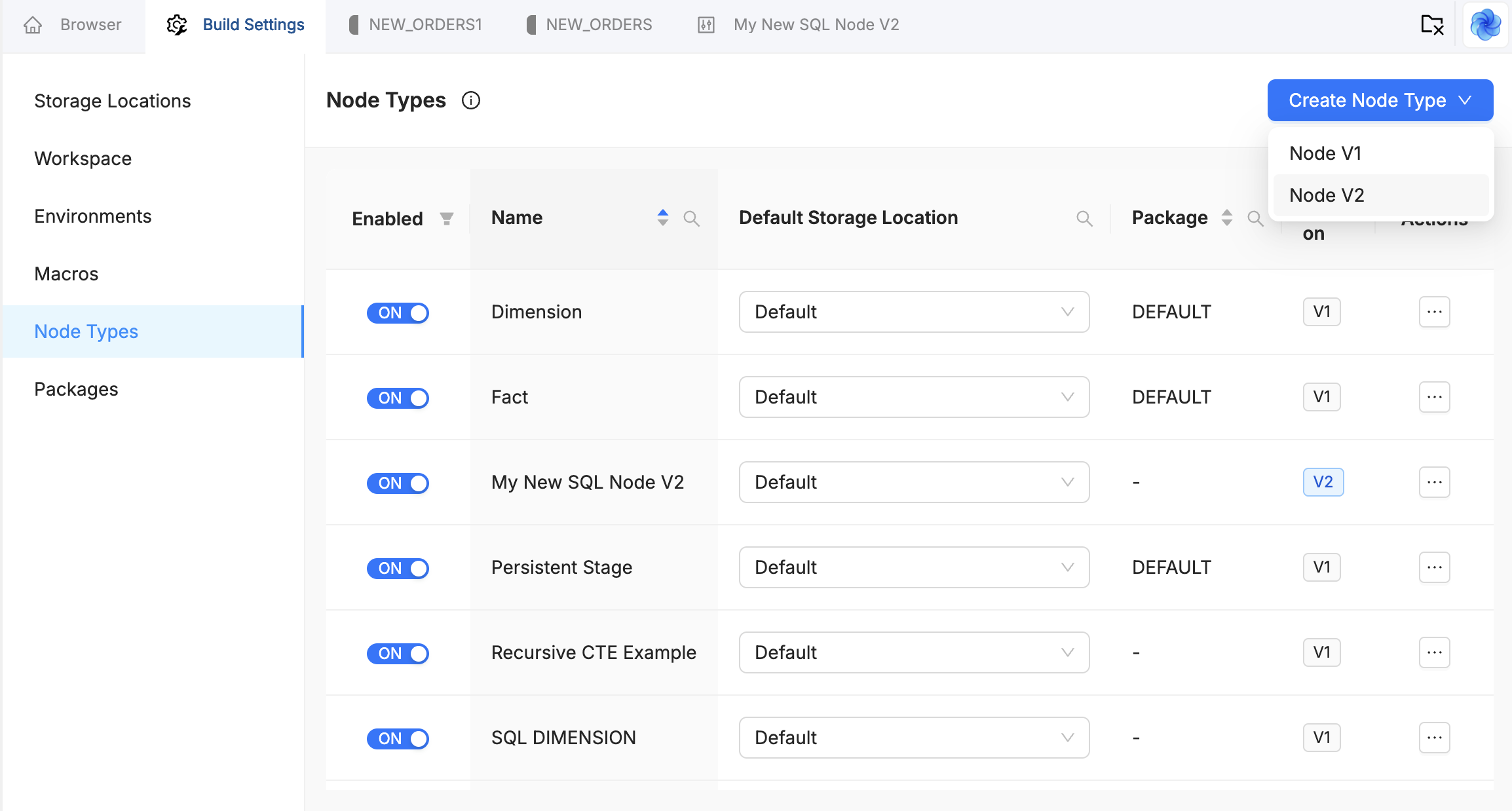
Go to Build Settings > Node Types, select the Create Node Type dropdown, and choose Node V2. Give it a descriptive name for staging, for example SQL Work.
The Node Type list includes a Version column so you can distinguish YAML and SQL types at a glance. You can also duplicate an existing SQL Node Type; the duplicate inherits the version and the original's templates.
Step 2: Declare Annotations and Add the Templates
A new SQL Node Type starts with a minimal definition and empty templates. Configure it before you rely on Nodes of the type in the graph:
- The definition declares the annotations the type supports, so Node authors can discover them in the Annotations panel.
- The Create template emits DDL. The Run template emits load logic. The templates consume the annotation values.
An annotation only affects deployed SQL if a template reads its value, so keep the declared set and the template logic in sync.
Node Type Definition
Add an annotations block to the definition. This example is a trimmed version of Coalesce's Work Node Type:
capitalized: Work
short: WRK
plural: Works
tagColor: '#2EB67D'

annotations:
  node:
    - name: writeMode
      description: >-
        How data is written to the target table. truncateInsert replaces the
        contents; append adds rows. Defaults to truncateInsert when omitted.
      parameters:
        - name: mode
          type: string
          isRequired: true
          default: truncateInsert
          options: [truncateInsert, append]
    - name: preSQL
      description: SQL statement to run before the load. Repeat to run several, in order.
      allowsMultiple: true
      parameters:
        - name: querySQL
          type: string
          isRequired: true
    - name: postSQL
      description: SQL statement to run after the load. Repeat to run several, in order.
      allowsMultiple: true
      parameters:
        - name: querySQL
          type: string
          isRequired: true
See the Annotation Declarations Reference for every declaration field.
Create Template
Create Template
{%- if node.materializationType == 'table' %}
    {{ stage('Create Table') }}
    CREATE OR REPLACE TABLE {{ ref_no_link(node.location.name, node.name) }}
    (
        {%- for col in columns %}
            "{{ col.name }}" {{ col.dataType }}
            {%- if col.nullable == false %} NOT NULL {%- endif %}
            {%- if col.defaultValue %} DEFAULT {{ col.defaultValue }} {%- endif %}
            {%- if col.description | trim | length > 0 %} COMMENT '{{ col.description | escape }}' {%- endif %}
            {%- if not loop.last -%}, {%- endif %}
        {%- endfor %}
    )
    {%- if node.description | trim | length > 0 %} COMMENT = '{{ node.description | escape }}' {%- endif %}

{%- elif node.materializationType == 'view' %}
    {{ stage('Create View') }}
    CREATE OR REPLACE VIEW {{ ref_no_link(node.location.name, node.name) }}
    (
        {%- for col in columns %}
            "{{ col.name }}"
            {%- if col.description | trim | length > 0 %} COMMENT '{{ col.description | escape }}' {%- endif %}
            {%- if not loop.last -%}, {%- endif %}
        {%- endfor %}
    )
    {%- if node.description | trim | length > 0 %} COMMENT = '{{ node.description | escape }}' {%- endif %}
    AS
    {{ sources[0].cteString }}
    SELECT {{ sources[0].selectModifier | default('', true) }}
    {%- for col in sources[0].columns %}
        {{ get_source_transform(col) }} AS "{{ col.name }}"
        {%- if not loop.last -%}, {%- endif %}
    {%- endfor %}
    {{ sources[0].join }}
{%- endif %}
Run Template
Run Template
{%- if node.materializationType == 'table' %}

    {# --- Pre-SQL: one stage per occurrence --- #}
    {%- for sql in config.preSQL | default([]) %}
        {{ stage('Pre-SQL ' ~ loop.index) }}
        {{ sql.parameters[0] }}
    {%- endfor %}

    {# --- Write mode: truncateInsert (default) or append --- #}
    {%- set writeMode = config.writeMode.parameters[0] if config.writeMode is defined else 'truncateInsert' %}
    {%- set insertMode = '' if writeMode == 'append' else 'OVERWRITE' %}

    {{ stage('Load Table') }}
    INSERT {{ insertMode }} INTO {{ ref_no_link(node.location.name, node.name) }}
    (
        {%- for col in sources[0].columns %}
            "{{ col.name }}"{%- if not loop.last -%}, {%- endif %}
        {%- endfor %}
    )
    {{ sources[0].cteString }}
    SELECT {{ sources[0].selectModifier | default('', true) }}
    {%- for col in sources[0].columns %}
        {{ get_source_transform(col) }} AS "{{ col.name }}"{%- if not loop.last -%}, {%- endif %}
    {%- endfor %}
    {{ sources[0].join }}

    {# --- Post-SQL --- #}
    {%- for sql in config.postSQL | default([]) %}
        {{ stage('Post-SQL ' ~ loop.index) }}
        {{ sql.parameters[0] }}
    {%- endfor %}

{%- else %}
    {{ stage('Load Skipped for View') }}
    -- The node {{node.name}} is materialized as View. Therefore, a Load operation is not supported.
    SELECT 1 AS INFO_MESSAGE WHERE FALSE
{%- endif %}
Note how the templates read each value: @writeMode("append") arrives as config.writeMode.parameters[0], the repeatable @preSQL and @postSQL arrive as arrays that the template loops over, and the template supplies the truncateInsert fallback itself because declared defaults are not applied at runtime. The reserved annotations arrive as real fields such as node.materializationType, col.nullable, col.defaultValue, and col.description. sources[0].cteString and sources[0].selectModifier carry the Node author's CTEs and any DISTINCT into the generated statement. See SQL Annotations Reference for the hydration shapes.
Step 3: Add a Node and Write Your SQL
- In the Build interface, add a new Node to your graph.
- Select your SQL Node Type as the Node Type.
- Use the SQL editor in the center panel instead of the mapping grid. If you attach downstream from an upstream Node, the editor can pre-populate with a starter
SELECT.
SQL Nodes are stored as .sql files. The file name follows LOCATION-NAME.sql, where LOCATION is the Storage Location and NAME is the Node name. YAML Nodes use .yml files instead.
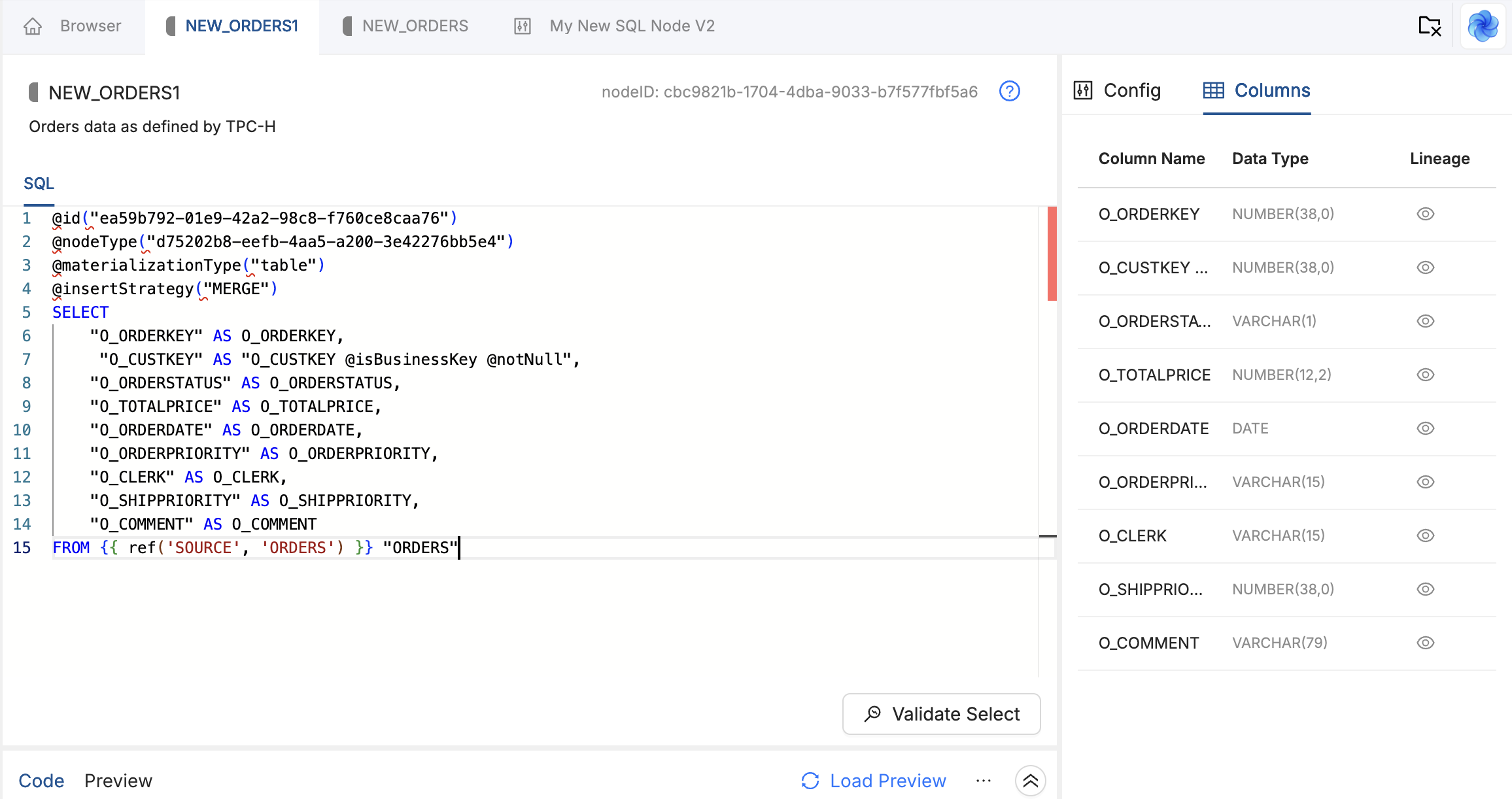
Write or paste a standard SELECT statement. Use {{ ref('LOCATION', 'NODE_NAME') }} to reference upstream Nodes so Coalesce can build the dependency graph and lineage.
SELECT
    o.O_ORDERKEY AS order_key,
    o.O_CUSTKEY AS customer_key,
    o.O_ORDERSTATUS AS order_status,
    o.O_TOTALPRICE::DECIMAL(12,2) AS order_total,
    o.O_ORDERDATE AS order_date
FROM {{ ref('STAGING', 'STG_ORDERS') }} o
When you save, Coalesce parses the SELECT and lists each column with its inferred name and data type. Confirm that every column you expect is present with the right type. If parsing fails for a type, add an explicit CAST in your SQL.
Coalesce adds @id and @nodeType when you create the Node. Do not edit @id. See SQL Annotations Reference.
Step 4: Configure the Node with Annotations
SQL Nodes do not use the mapping grid. You configure behavior with annotations in the Node's SQL. The Annotations panel on the Node's Config tab lists what your Node Type supports, with copyable snippets.
@materializationType("table")
@writeMode("append")
@preSQL("DELETE FROM {{ this }} WHERE order_date < DATEADD(DAY, -90, CURRENT_DATE())")

SELECT
    o.O_ORDERKEY AS order_key @notNull,
    o.O_CUSTKEY AS customer_key,
    o.O_ORDERSTATUS AS order_status,
    o.O_ORDERDATE AS order_date
FROM {{ ref('STAGING', 'STG_ORDERS') }} o
@materializationType and @notNull are reserved and work on every SQL Node Type. @writeMode and @preSQL work here because Step 2 declared them and the templates consume them. See SQL Annotations Reference for syntax and the reserved set.
Step 5: Validate Select, Create, and Run
- Validate Select checks the Node SQL and shows compiled SQL before you deploy.
- Create deploys the Node and runs the Create template DDL in your warehouse.
- Run executes the Run template DML and loads the table.
After running, check that lineage and data look correct:
- DAG view - Upstream dependencies from your
{{ ref() }}calls appear in the graph. - Warehouse - Query the target table to confirm data.
Full Example
This example uses sample data: it joins orders and line items and uses CTEs.
@materializationType("table")
@writeMode("truncateInsert")

WITH orders_base AS (
    SELECT
        O_ORDERKEY AS order_key,
        O_CUSTKEY AS customer_key,
        O_ORDERSTATUS AS order_status,
        O_TOTALPRICE AS order_total_price,
        O_ORDERDATE AS order_date,
        TRIM(O_ORDERPRIORITY) AS order_priority
    FROM {{ ref('STAGING', 'STG_ORDERS') }} "ORDERS"
),

lineitem_base AS (
    SELECT
        L_ORDERKEY AS order_key,
        L_LINENUMBER::NUMBER AS line_number,
        L_QUANTITY AS quantity,
        L_EXTENDEDPRICE AS extended_price,
        L_DISCOUNT AS discount_percent,
        L_EXTENDEDPRICE * (1 - L_DISCOUNT) AS discounted_price
    FROM {{ ref('STAGING', 'STG_LINEITEM') }} "LINEITEM"
)

SELECT
    o.order_key,
    li.line_number,
    o.customer_key,
    o.order_date,
    o.order_status,
    o.order_priority,
    li.quantity,
    li.extended_price,
    li.discount_percent,
    li.discounted_price
FROM orders_base o
INNER JOIN lineitem_base li
    ON o.order_key = li.order_key
After saving, Coalesce infers 10 columns with their types. The DAG lists dependencies on STG_ORDERS and STG_LINEITEM. Create builds the table and Run loads it.
Best Practices
- Keep Dimensions and Facts on YAML Nodes - Rename and history behavior stay on the mapping grid. Author Stage, Work, and other transformation-heavy Nodes as SQL Nodes. See Choosing Between YAML and SQL Node Types.
- Alias your columns - Explicit aliases give the parser the clearest signal for column names. On a SQL Node, the name in the
SELECTis the column identity. - Cast ambiguous types - If a column's data type shows as
UNKNOWN, add an explicit cast in your SQL:value::TIMESTAMP_NTZorCAST(value AS DECIMAL(12,2)). - Start simple - Write a basic
SELECTfirst, confirm columns parse correctly, then add CTEs, window functions, or annotations.
What's Next?
- Node Types Overview for how YAML and SQL fit together in one pipeline.
- SQL Annotations Reference for annotation syntax and hydration shapes.
- Defining a SQL Node Type for node type authoring in depth.
- The SQL Node Editor for a walkthrough of every part of the interface.
- Troubleshooting and FAQ for common parse, column, and lineage issues while authoring SQL Nodes.