Documentation index: llms.txt. This page is also available as markdown: append .md to this URL or send Accept: text/markdown.
Ref Functions
These are used to generate database object names specific to the current environment and to establish relationships in the DAG for orchestrating node execution.
When to Use Each Function
Choose the function based on whether you need a fully qualified name, a DAG dependency, or both. The table below summarizes when to use each option.
| Function | Use when you need to | Output | Creates DAG link? |
|---|---|---|---|
ref() | Reference another Node in your SQL and track it as a dependency | Fully qualified name (for example, "myDB"."mySCHEMA"."CUSTOMER" on Snowflake or `myDB`.`mySCHEMA`.`CUSTOMER` on Databricks or BigQuery) | Yes |
ref_link() | Force execution order without referencing the Node in SQL | Empty string | Yes |
ref_no_link() | Reference a Node in SQL without adding a DAG dependency | Fully qualified name | No |
{{this}} | Reference the current Node (for example, in tests or Post-SQL) | Fully qualified name of current object | N/A |
Quick examples:
- JOINs, FROM clauses, SELECT in views: use
ref()so the graph shows the dependency. - Execution order only: for example, when Node A must run before Node B but B does not query A, use
ref_link()in the Join tab or SQL. - Self-reference on the current Node with UPDATE or MERGE, Pre-SQL or Post-SQL backups, subqueries where you don't want lineage, or external objects such as user-defined Nodes: use
ref_no_link()with explicit location and Node names, or{{this}}when you mean the current Node. Both resolve like a no-link reference to that object. Do not useref()to refer to the Node you are defining, because that would imply a dependency on yourself.
ref()
ref is used to resolve the fully qualified name of a Node from its logical Storage Location and Node name. Using ref() will also add reference to your graph as a dependency.
This is most commonly used in join conditions to render the fully qualified Node name.
Syntax
ref('<location_name>','<node_name>')
Resolves To
- Snowflake
- Databricks
- BigQuery
{{ ref('STG','CUSTOMER') }} = "myDB"."mySCHEMA"."CUSTOMER"
{{ ref('STG','CUSTOMER') }} = `myDB`.`mySCHEMA`.`CUSTOMER`
{{ ref('STG','CUSTOMER') }} = `myDB`.`mySCHEMA`.`CUSTOMER`
ref() Examples
Adding a Node to your graph
The most basic example is adding a Node to your graph. In the following example, STG_CUSTOMER was from the source CUSTOMER Node, FROM {{ ref('WORK', 'CUSTOMER') }}.
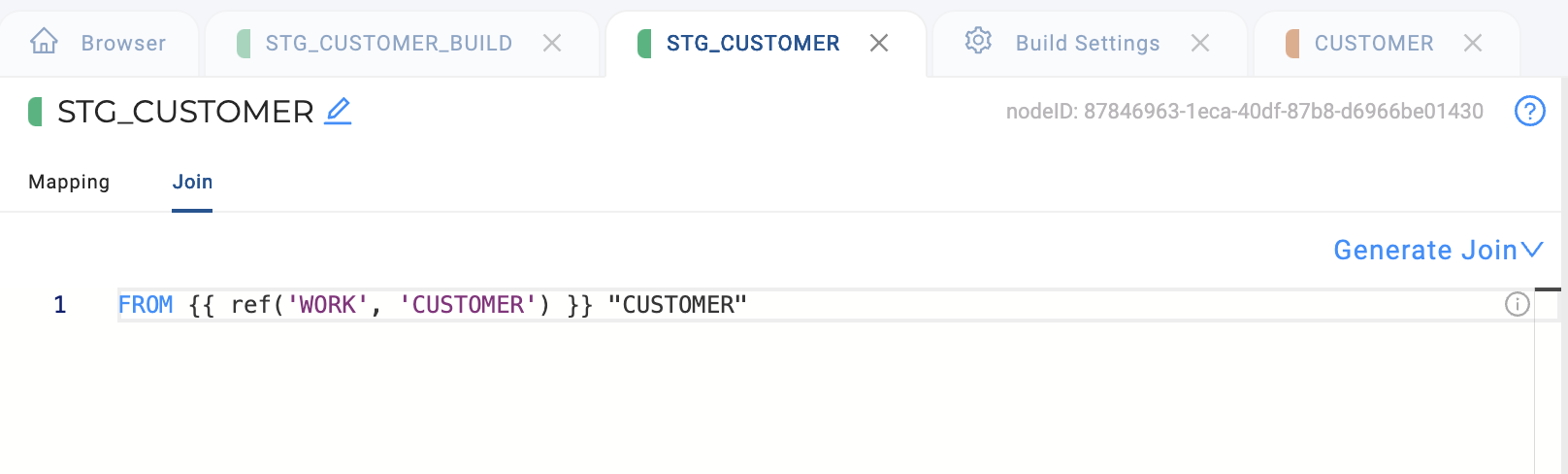
'WORK' points to the Storage Mapping WORK. The Storage Mapping WORK in the workspace points to the fully qualified database and schema, SNOWFLAKE_SAMPLE_DATA.TPCH_SF10.
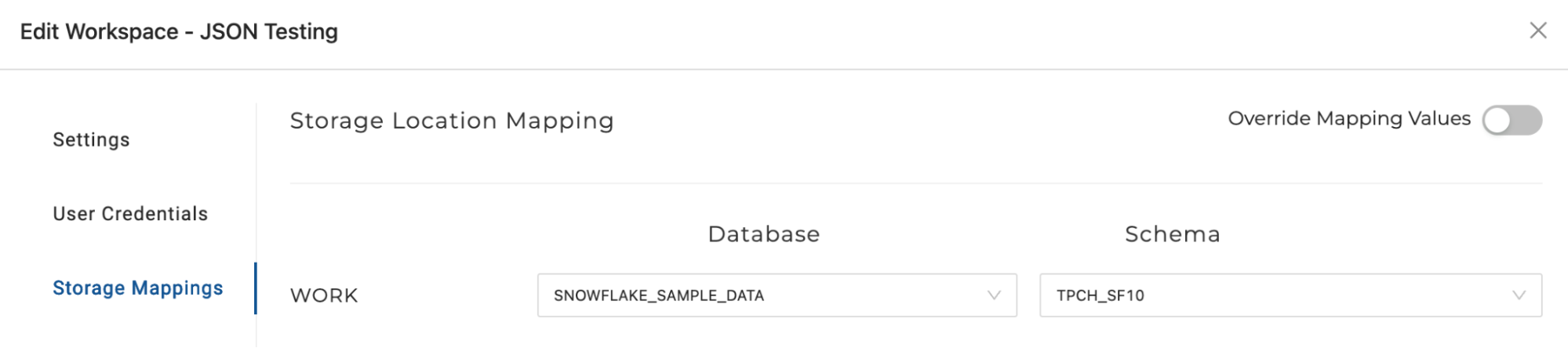
Because WORK is a dynamic reference that points to a fully qualified database name and schema in the Storage Mapping, if you want to deploy to a new environment, then the reference will point to the fully qualified name of the database or schema in the Storage Location of the environment deployed to. In the QA Environment below, WORK is pointing to a different database and schema.
JOINs and FROM clauses
Use ref() whenever you query another Node so the DAG shows the dependency:
- Snowflake
- Databricks
- BigQuery
SELECT o."O_ORDERKEY", c."C_NAME"
FROM {{ ref('WORK', 'ORDERS') }} o
INNER JOIN {{ ref('WORK', 'CUSTOMER') }} c ON o."O_CUSTKEY" = c."C_CUSTKEY"
SELECT o.`O_ORDERKEY`, c.`C_NAME`
FROM {{ ref('WORK', 'ORDERS') }} o
INNER JOIN {{ ref('WORK', 'CUSTOMER') }} c ON o.`O_CUSTKEY` = c.`C_CUSTKEY`
SELECT o.`O_ORDERKEY`, c.`C_NAME`
FROM {{ ref('WORK', 'ORDERS') }} o
INNER JOIN {{ ref('WORK', 'CUSTOMER') }} c ON o.`O_CUSTKEY` = c.`C_CUSTKEY`
CREATE VIEW
When creating a view that selects from other Nodes, use ref() for the source in the SELECT so Coalesce can track lineage. For the view name (the current Node), use ref_no_link() to avoid a cyclical dependency:
- Snowflake
- Databricks
- BigQuery
CREATE OR REPLACE VIEW {{ ref_no_link('WORK', 'V_ORDER_SUMMARY') }} AS
SELECT * FROM {{ ref('WORK', 'ORDERS') }}
CREATE OR REPLACE VIEW {{ ref_no_link('WORK', 'V_ORDER_SUMMARY') }} AS
SELECT * FROM {{ ref('WORK', 'ORDERS') }}
CREATE OR REPLACE VIEW {{ ref_no_link('WORK', 'V_ORDER_SUMMARY') }} AS
SELECT * FROM {{ ref('WORK', 'ORDERS') }}
ref() Summary
- Uses Storage Locations to dynamically point to your data platform's database and schema.
- To use in multiple environments, the ref location name should be the same. For example, use location WORK in both QA and Testing environments.
ref_link()
Use ref_link() to add a reference to the graph as a dependency. ref_link() doesn’t create a string in the template. This means it will link between the Nodes, but not refer to any object.
This is most commonly used to create a dependency on the execution of a Node, without directly referencing that Node in your SQL. For example, to force a Node to run before the current Node, add ref_link() in the Join tab of the downstream Node.
Syntax
ref_link('<location_name>','<node_name>')
Resolves To
{{ ref_link('STG','CUSTOMER') }} resolves to (empty string)
When to use ref_link()
- You need Node B to run before Node A, but Node A does not query Node B (for example, B builds a table that A expects to exist).
- You want Subgraphs to show links between Nodes even when the reference is not in the main query.
- You need execution order without adding the Node to your FROM or JOIN clause.
Example
Add ref_link() as a standalone line in your SQL. It outputs nothing but creates the DAG link:
- Snowflake
- Databricks
- BigQuery
FROM {{ ref('TGT_STAGE', 'STG_TRANSACTIONS') }} "STG_TRANSACTIONS"
WHERE "DOCDATE" >= '2021-01-01'
{{ ref_link('TGT_STAGE', 'STG_TRANSACTIONS_DELETES') }}
FROM {{ ref('TGT_STAGE', 'STG_TRANSACTIONS') }} `STG_TRANSACTIONS`
WHERE `DOCDATE` >= '2021-01-01'
{{ ref_link('TGT_STAGE', 'STG_TRANSACTIONS_DELETES') }}
FROM {{ ref('TGT_STAGE', 'STG_TRANSACTIONS') }} `STG_TRANSACTIONS`
WHERE `DOCDATE` >= '2021-01-01'
{{ ref_link('TGT_STAGE', 'STG_TRANSACTIONS_DELETES') }}
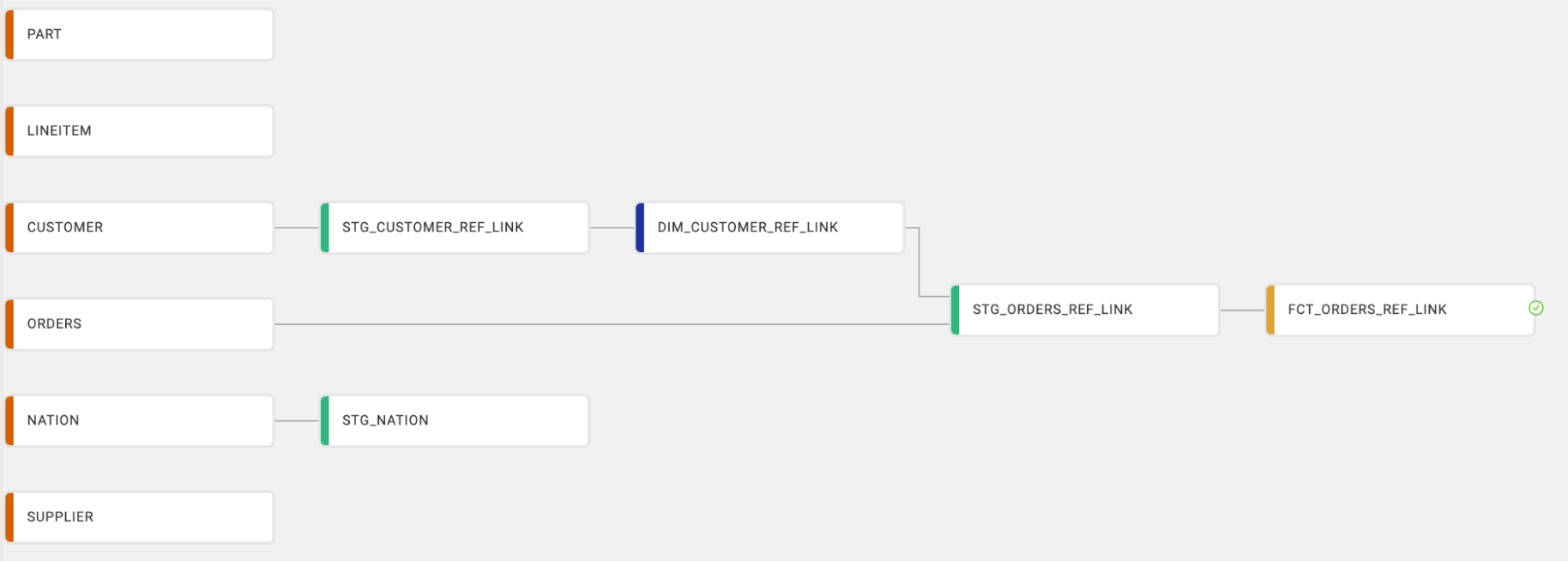
Here, STG_TRANSACTIONS_DELETES must run before this Node (for example, to populate a table used elsewhere), but this query does not select from it. The ref_link() ensures the dependency appears in the graph and controls execution order.
ref_no_link()
ref_no_link() is used to resolve the fully qualified name of a Node from its logical Storage Location and Node name. Refer to any object in the DAG without creating a connection. This is most commonly used when referencing the fully qualified name of the current Node within its own template. Without ref_no_link, a cyclical dependency would be created, which is not allowed. ref_no_link() is good for when you need to reference something once, but don’t need to track its lineage.
Syntax
ref_no_link('<location_name>','<node_name>')
Resolves To
- Snowflake
- Databricks
- BigQuery
{{ ref_no_link('STG','CUSTOMER') }} resolves to "myDB"."mySCHEMA"."CUSTOMER"
{{ ref_no_link('STG','CUSTOMER') }} resolves to `myDB`.`mySCHEMA`.`CUSTOMER`
{{ ref_no_link('STG','CUSTOMER') }} resolves to `myDB`.`mySCHEMA`.`CUSTOMER`
When to use ref_no_link()
- Self-reference: Referencing the current Node in its own template (for example, UPDATE, MERGE, or Post-SQL). Using
ref()would create a cyclical dependency. - Pre-SQL or Post-SQL backups: Copying data from another Node without adding a DAG dependency.
- Subqueries or filters: Using data from another Node in a WHERE or SELECT without tracking lineage.
- External objects: Referencing user defined Nodes or other objects that are not Coalesce Nodes. See Use Snowflake User Defined Functions (UDF) for an example.
- Incremental loading: Referencing a high-water mark table in a filter without creating a link.
Example 1: Subquery in a WHERE clause
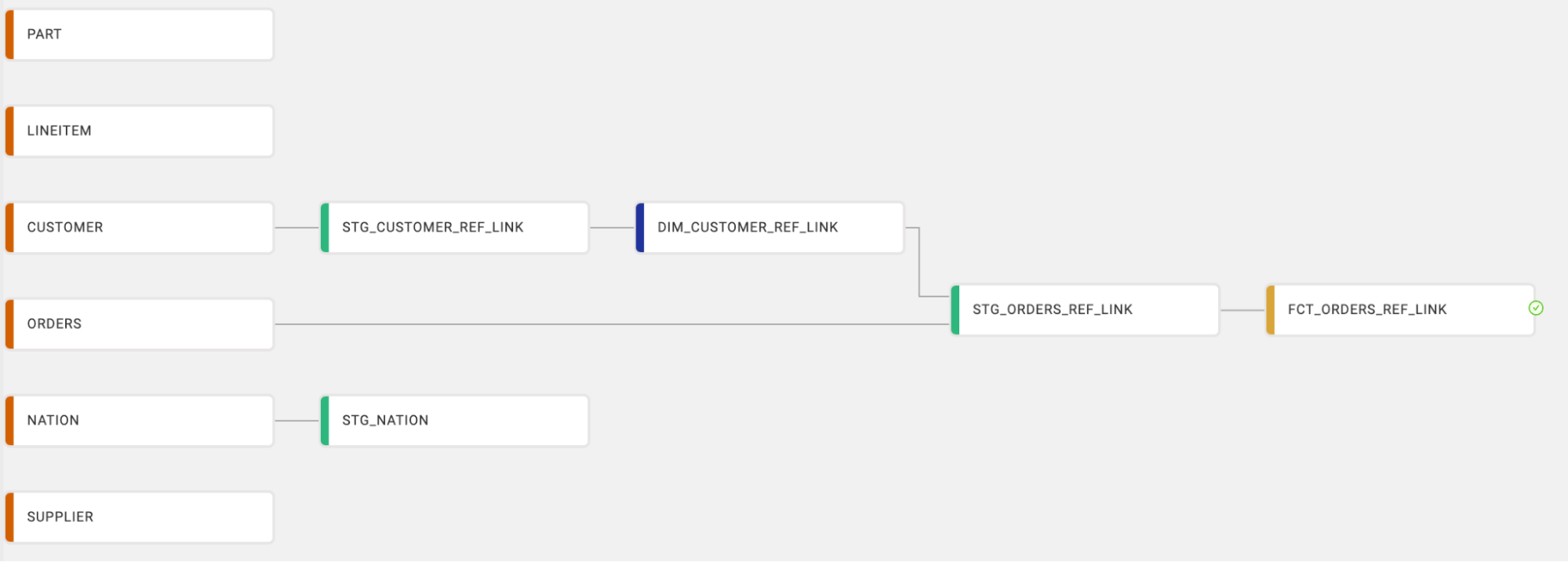
You want to reference a set of values from the DIM_CUSTOMER_REF_LINK Node in the STG_NATION query without creating a link between the Nodes:
- Snowflake
- Databricks
- BigQuery
FROM {{ ref('WORK', 'NATION') }} "NATION"
WHERE "NATION"."CUSTOMER_ID" IN (
  SELECT "TABLE2"."CUSTOMER_ID"
  FROM {{ ref_no_link('WORK', 'DIM_CUSTOMER_REF_LINK') }} "TABLE2"
)
FROM {{ ref('WORK', 'NATION') }} `NATION`
WHERE `NATION`.`CUSTOMER_ID` IN (
  SELECT `TABLE2`.`CUSTOMER_ID`
  FROM {{ ref_no_link('WORK', 'DIM_CUSTOMER_REF_LINK') }} `TABLE2`
)
FROM {{ ref('WORK', 'NATION') }} `NATION`
WHERE `NATION`.`CUSTOMER_ID` IN (
  SELECT `TABLE2`.`CUSTOMER_ID`
  FROM {{ ref_no_link('WORK', 'DIM_CUSTOMER_REF_LINK') }} `TABLE2`
)
Example 2: Self-reference in Post-SQL
Updating the current Node's table in Post-SQL must not use ref() on that same Node (that would create a cyclical dependency). Use ref_no_link() with explicit names, or {{this}}, which resolves the same way for the Node being built:
- Snowflake
- Databricks
- BigQuery
UPDATE {{ ref_no_link('WORK', 'STG_ORDERS_TRANSFORM') }}
SET "STATUS" = 'PROCESSED'
WHERE "ORDER_DATE" < CURRENT_DATE
UPDATE {{ ref_no_link('WORK', 'STG_ORDERS_TRANSFORM') }}
SET `STATUS` = 'PROCESSED'
WHERE `ORDER_DATE` < CURRENT_DATE
UPDATE {{ ref_no_link('WORK', 'STG_ORDERS_TRANSFORM') }}
SET `STATUS` = 'PROCESSED'
WHERE `ORDER_DATE` < CURRENT_DATE
Equivalent when STG_ORDERS_TRANSFORM is the current Node:
- Snowflake
- Databricks
- BigQuery
UPDATE {{this}}
SET "STATUS" = 'PROCESSED'
WHERE "ORDER_DATE" < CURRENT_DATE
UPDATE {{this}}
SET `STATUS` = 'PROCESSED'
WHERE `ORDER_DATE` < CURRENT_DATE
UPDATE {{this}}
SET `STATUS` = 'PROCESSED'
WHERE `ORDER_DATE` < CURRENT_DATE
Example 3: Pre-SQL backup
Creating a backup table from another Node without adding a DAG dependency:
CREATE OR REPLACE TABLE DOCUMENTATION.DEV.SUPPLIER_BACKUP AS
SELECT * FROM {{ ref_no_link('WORK', 'STG_SUPPLIER') }};
You can also find example usage in the Stage-Base Templates section of our User-defined Nodes (UDNs) article.
Summary
- It doesn’t add a relationship in your DAG.
- You can use it with filter statements like WHERE or SELECT. Good for infrequent use cases and incremental loading.
this
The {{this}} template variable resolves to the fully qualified name of the current Node’s object (database, schema, and object name as defined by Storage Mapping in the active Environment). Use it anywhere you would otherwise spell out the current Node with ref_no_link(node.location.name, node.name) in user-defined node templates. In Hydrated Metadata for those node types, the this field is exactly that ref_no_link expression; {{this}} is the shorthand in SQL templates.
Syntax
{{this}}
When to use {{this}}
- DDL for the object the Node creates (for example,
CREATE OR REPLACE TABLE {{this}}). - Post-SQL or Pre-SQL that reads or writes the current Node’s table or view (for example,
UPDATE {{this}}after a load). Same dependency behavior asref_no_link()for that Node: no extra DAG edge to yourself. - Tests and custom test SQL that need a
FROMclause targeting the object under test. - Stored procedure DDL where the procedure should live at the mapped location for the Node. See Stored procedures.
Do not use ref() with the current Node’s location and name in those cases, because Coalesce treats that as a graph dependency on yourself.
Database and schema only
{{this}} always includes the object (table, view, or similar). If you need only the mapped database and schema in Jinja (for example, for logging or auxiliary DDL), loop over storageLocations and use location.database and location.schema. See Access Hydrated Metadata.
Example: test SQL
There are several ways to use {{this}}. In this example you have a Customer table, and you only want rows where C_MKTSEGMENT = 'BUILDING'. To validate, create a test that looks for the value you don’t want, FURNITURE.
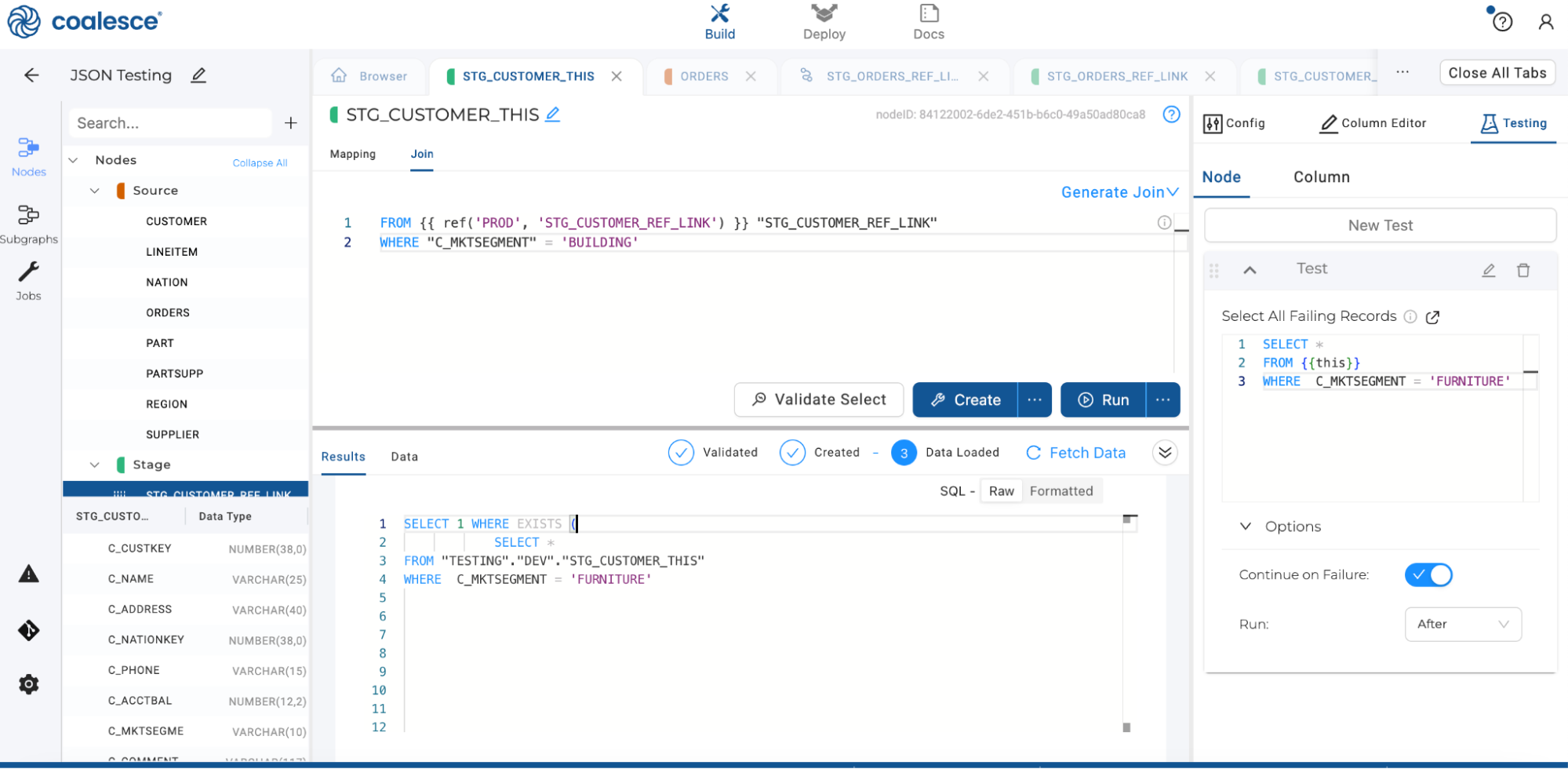
SELECT *
FROM {{this}}
WHERE  C_MKTSEGMENT = 'FURNITURE'
The test uses {{this}} for the fully qualified object. When the test runs, that expands to the correct name for the Environment.
The compiled SQL looks like:
- Snowflake
- Databricks
- BigQuery
SELECT 1 WHERE EXISTS (
           SELECT *
FROM "TESTING"."DEV"."STG_CUSTOMER_THIS"
WHERE  C_MKTSEGMENT = 'FURNITURE'
SELECT 1 WHERE EXISTS (
           SELECT *
FROM `TESTING`.`DEV`.`STG_CUSTOMER_THIS`
WHERE  C_MKTSEGMENT = 'FURNITURE'
SELECT 1 WHERE EXISTS (
           SELECT *
FROM `TESTING`.`DEV`.`STG_CUSTOMER_THIS`
WHERE  C_MKTSEGMENT = 'FURNITURE'
Using {{this}} keeps the same template valid across Environments and Workspaces.